High-volatility trend strategy · Setup guide · 2026
Extreme Series explained: the three strategies and the three settings that matter
⚠️ Read this before deciding whether to use it
Extreme Series is the highest-risk product line on CoinTech2u, and it is a separate lane from the platform's more defensive Multiplication / AI strategies. Do not judge it by the same expectations:
- • There is no hard per-trade stop loss — the losing side carries its unrealised loss and keeps laddering until the layer cap.
- • The only account-level backstops are the Equity Guard you set yourself and the exchange's own liquidation engine.
- • It is built for big moves and profits either way — but it needs a trend: the more extreme the move the better, while a long sideways range grinds it down.
- • So it suits capital you deliberately commit when you expect a market to move hard (direction optional) — not a set-and-forget conservative position.
This article covers the logic behind every option in Extreme Series: how it makes money, when not to use it, how to choose between the three strategies, and how the three settings that decide when it stops — Profit Goal, Rebound Stop and Equity Guard — actually behave, with the official worked examples. If you just want to click through it, go straight to the 14-step illustrated tutorial.
I. What Extreme Series actually does
In one line: it does not fight the trend, it rides it — up or down, as long as the move is big enough. When a one-way move starts, whether a sharp spike or a hard sell-off, the engine reads market momentum in real time and shifts with the trend, trying to keep the position on the right side of the move and turn violent swings into unrealised profit.
So what it really needs is movement, not "up": either direction works, standing still does not. That is also its one weakness — in a narrow range the trend never forms, and positions get whittled down by repeated reversals. That is inherent to the mechanism, not a matter of tuning, which is why when to use it matters more than how to configure it.
As for direction — you do not have to call it right, but calling it right pays more. Extreme Series ships three modes (Bull Extreme, Bear Extreme, balanced Extreme); both the long and short chains run in every mode, and the right mode increases profit substantially. When you genuinely cannot call the direction, the balanced mode still runs — see section IV.
The same logic runs across several markets: beyond crypto futures, it also covers the traditional-finance, gold and silver contract markets CoinTech2u supports. When crypto goes quiet and another market is livelier, picking the venue becomes part of the strategy — but remember that moving to a more volatile market cuts both ways: faster gains with the trend, and still no per-trade stop against you. For exactly how US stock instruments fit in, see the dedicated article, What are US stock perpetual futures?
II. What you need first
① A portfolio with an API bound
Your principal stays in your own exchange account and the platform trades through the API. Not bound yet? Start at the Tutorial Center and follow your exchange's registration and API setup.
② That portfolio must be idle
A portfolio already running another strategy cannot be selected — the list marks it as currently trading. Stop it first, or use a spare portfolio.
③ At least 500 USDT of trading capital
500 USDT minimum per portfolio, in 500 USDT tiers, up to 10,000 USDT for one portfolio. If your equity does not land on a tier, the setup page asks you to top up the difference or move the excess out.
④ Lockable balance in the Gas Fee wallet
Starting locks an amount up front (nothing is deducted while it runs — see section VI). With too little, Start is unavailable and the page offers a top-up link.
III. Hands-on: the illustrated tutorial
Every screen of the actual flow — from the bottom navigation into the Strategy Center, through the three-step page, the fee review, starting, and the running portfolio page — is captured as a 14-step walkthrough on its own page, so you can follow it while tapping.
Extreme Series setup tutorial: 14 steps from Strategy Center to running →
A screenshot for every step: open Extreme Series → choose a portfolio → set strategy and coins → review and start.
The rest of this article is about the reasoning behind each option: how to choose among the three strategies, what the Extreme level changes, and the three settings that decide when it stops.
IV. Three strategy types + Extreme level
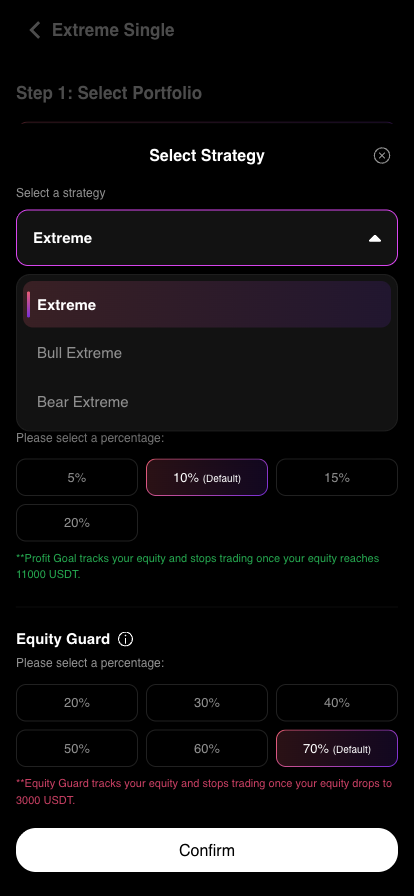
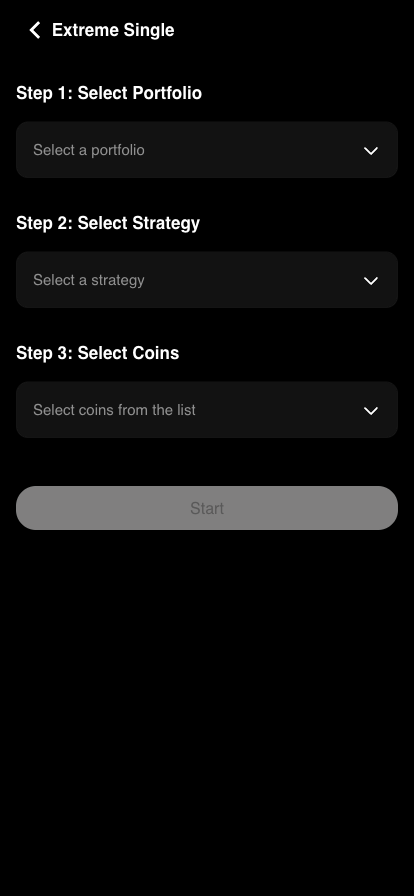
Step 2, "Select Strategy", really only asks two things: the strategy type and the Extreme level. All three modes make money from trends and trade both directions; they differ in which side they weight — and the right mode substantially increases what the same move pays.
Bull Extreme
Bullish. Use it when you expect the market to rally hard.
Bear Extreme
Bearish. Use it when you expect a steep decline.
Extreme
Balanced. Use it when you cannot call the direction but expect a large move.
All three sit in one dropdown:
The Extreme level has just three settings:
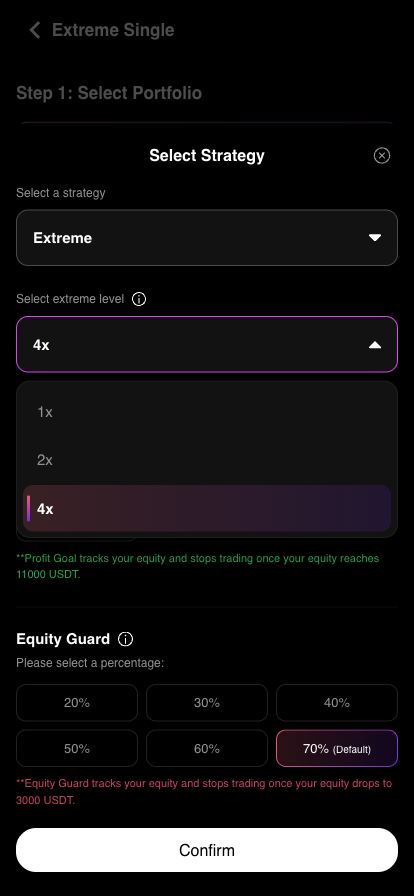
The level also moves the Equity Guard default
Switching the level from 1× to 4× moves the Equity Guard default from 30% to 70% — the higher the level, the deeper the drawdown the system assumes you will sit through. You can change that default, but treat it as a signal: 4× scales up the drawdown room, not just the upside.
How to choose — and what happens if you get it wrong
Picking the wrong side is not fatal: both chains run in every mode, so a wrong call means slower progress, not an automatic loss. If you cannot read the direction, use the balanced Extreme and both sides stay even. What actually decides the outcome is always whether a big trend shows up — not whether you guessed right.
The Extreme level is 1× / 2× / 4×. A higher level runs more aggressively on the same capital — potential gains and potential drawdown scale together. Start at 1× if you are unsure.
Everything else is automatic: you do not set entry size, ladder count or leverage. The system derives the first order size and every subsequent add from your capital size and live market conditions. For what changing leverage actually does, see the leverage and position sizing guide.
V. The three key settings (with worked examples)
These three decide when the strategy stops — far more important than which coins you pick. Profit Goal and Rebound Stop are mutually exclusive; Equity Guard is independent downside protection.
1. Profit Goal — bank it and leave
Set a gain worth 5%–20% of capital. Positions keep running while in profit, and when equity reaches "capital + target" the portfolio closes everything and stops trading, banking the gain.
Profit = 1,000 × 10% = 100 USDT → Target = 1,000 + 100 = 1,100 USDT
Equity hits 1,100 USDT, the target is met and the system stops trading automatically.
2. Rebound Stop — leave once it recovers from the low
Instead of a fixed target, it tracks and records the lowest equity reached, then closes everything once equity recovers by your chosen amount from that low. Formula: stop level = lowest equity + (initial capital × your percentage).
Rebound = 1,000 × 20% = 200 USDT → stop level = low of 700 + 200 = 900 USDT (stops below initial capital — cutting the loss)
Stop level = low of 950 + 200 = 1,150 USDT (above initial capital — leaving with a gain)
In the app the two are one or the other: switch the Profit Goal toggle off and the panel below swaps to the Rebound Stop percentages. The red note does the arithmetic live — pick 20% on 3,000 USDT and it states "stops trading once equity recovers by 600 USDT".
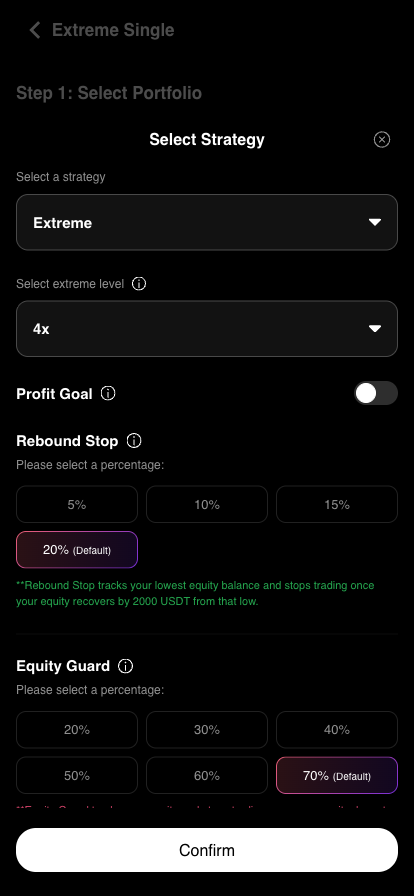
3. Equity Guard — where it must stop
Set a stop-loss level on total equity based on the drawdown you can live with. When equity falls to that level the system closes every position and stops trading, preserving what is left. Formula: stop level = capital − (capital × your percentage).
Drawdown = 1,000 × 20% = 200 USDT → stop level = 1,000 − 200 = 800 USDT
Be clear about this: Equity Guard is a portfolio-level stop, not a per-trade stop. Individual positions are not cut before it triggers — the unrealised loss is carried. For a fuller treatment of protection settings, see the Smart Protection guide.
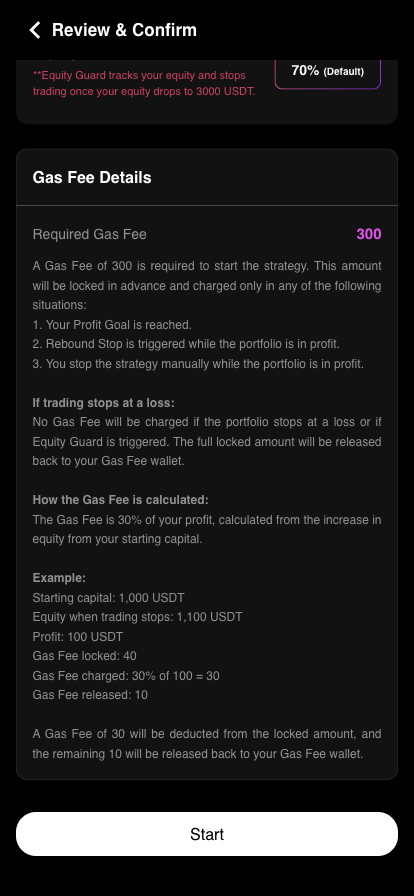
VI. How the fee works: charged only out of profit
Ends in profit
Target reached, or you stop it manually while in profit → 30% of the actual profit is charged.
Ends in a loss
Including Rebound Stop or Equity Guard triggering → the whole locked amount is released, nothing charged.
When you start, the system locks the corresponding Gas Fee up front, charges nothing while the strategy runs, and settles on the outcome. How much gets locked scales with capital size and profit target, and the setup page states the exact amount before you start.
All of this is spelled out under Fee Details at the bottom of the Review & Confirm page, so you can check it before starting. In practice the locked amount follows the capital tier: the 3,000 USDT tier locks 90, the 10,000 USDT tier locks 300. If your balance is short, the page will not let you tap Start blindly — it states the shortfall and offers a top-up link.
Fee Details on the Review & Confirm page:
The three-step page before anything is filled in:
VII. Single vs Trio
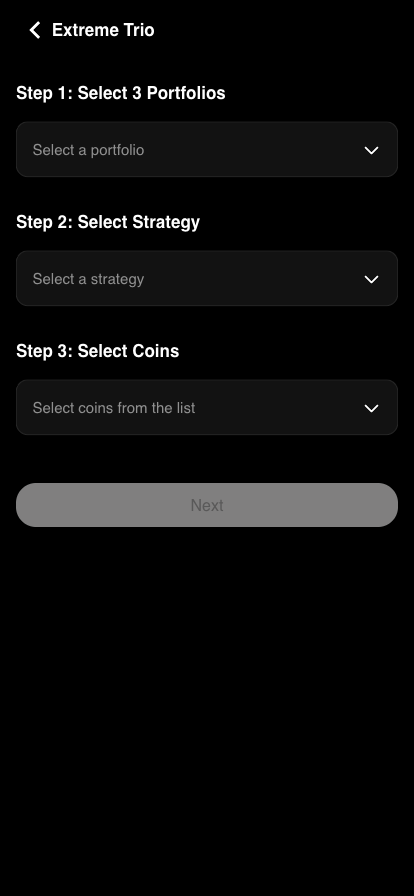
Extreme Trio runs three portfolios at once and settles on the combined result: each portfolio can hold a different set of coins to spread risk, but all three must be the same capital size for the aggregate to be calculated correctly.
The entry point is the same as Single (see step 4 of the tutorial); Step 1 simply asks you to pick three portfolios at once, and the bottom button reads Next rather than Start — Profit Goal and Equity Guard are set on the aggregate, so there is one extra confirmation page.
| Portfolio | Capital | Profit |
|---|---|---|
| 1 | 1,000 USDT | 40 USDT (4%) |
| 2 | 1,000 USDT | 180 USDT (18%) |
| 3 | 1,000 USDT | 80 USDT (8%) |
| Total | 3,000 USDT | 300 USDT (10%) |
In other words: one portfolio on its own may look slow, but as soon as combined equity reaches 3,300 USDT (3,000 + 10%), all three close and stop together. The profit target and stop target are set once, for the group.
VIII. Risks and FAQ
Four things you must know
- 1. No per-trade stop loss. A losing position is not closed on its own — it carries the unrealised loss and keeps laddering until the layer cap. That is by design, not a fault.
- 2. The backstop is at account level. Only two things force a stop: the Equity Guard you set (a stop level on total equity) and the exchange's liquidation engine. Whether to enable Equity Guard, and where, is a decision only you can make.
- 3. It earns from volatility, not direction. Either direction works, but the trend has to be big enough; in a choppy range the trend never forms, the profit target stays out of reach and positions are whittled down by reversals.
- 4. The timeframe is uncertain. Some portfolios hit target in days, others may take months, depending on your target and market volatility.
Q: Can I run Extreme Series and Multiplication together?
Yes, but run them in separate portfolios and evaluate them separately. Their risk structures are completely different, and reading them as one number leads to wrong conclusions.
Q: Can I change settings mid-run?
Once started, the strategy runs on the configuration it started with. To change the type, level or target you have to stop the current strategy and set it up again — and stopping means settling at the P&L of that moment.
Q: What is a steady way to start the first time?
Begin with Single + 1× level + the lowest capital tier, and always set Equity Guard. Only commit money whose swings you can fully absorb.
Further reading
- • Live Extreme leaderboard: real user profit data, cross-checkable against the official app
- • Extreme Series setup tutorial: 14 steps from Strategy Center to running
- • Extreme Series risk guide: who it suits, who should avoid it, and what the worst case looks like
- • Smart Protection Guide: choosing the right Equity Guard and Profit Guard
- • What leverage actually is — and why changing it does not change your risk
- • CoinTech2u Tutorial Center: full setup guides for four exchanges
- • The complete guide to crypto futures AI trading bots
Don't take our word for it — look at the live data
An equity curve is more honest than marketing copy. Once registered you can browse the live leaderboard and track record, and judge for yourself whether it fits you.
Register free to view