Back to Blog List

How to Transfer Funds to Your OKX Trading Wallet

Tutorial
C
CoinTech2u
CoinTech2u Community Columnist
Guide to transfer USDT from your OKX Funding Wallet to Trading Wallet for both main account and sub-account trading with CoinTech2u.
I

Main Account Transfer

If you are trading with your main OKX account, follow these 3 steps to transfer funds to your Trading Wallet.

Step 1: Open Your Assets

After logging into your main account on the OKX App, tap Assets in the bottom right corner to view your wallet balances.
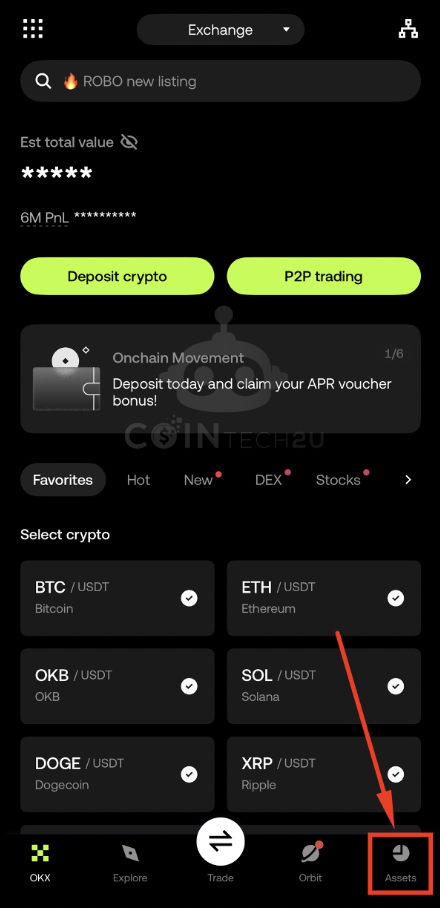
Tap Assets in OKX main account

Step 2: Tap "Transfer"

Tap the Transfer button to open the internal transfer interface between your wallets.
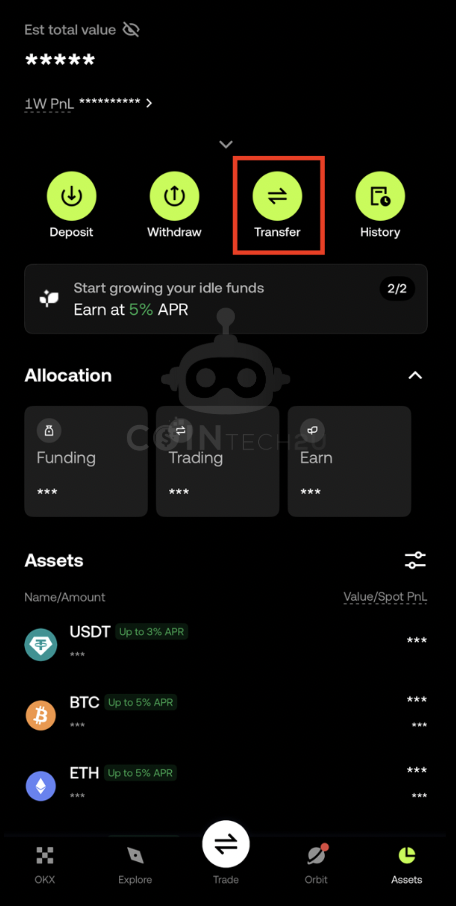
Tap Transfer button in OKX Assets

Step 3: Transfer from Funding to Trading

Set the source as Funding and destination as Trading. Enter the USDT amount you want to transfer for trading and tap Confirm. The transfer is instant and free.
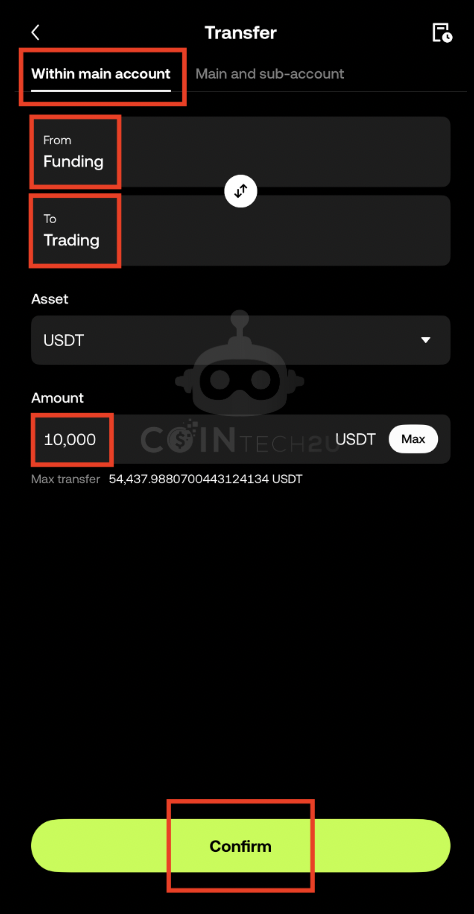
Transfer USDT from Funding to Trading Wallet on OKX
II

Sub-Account Transfer

If you are trading with a sub-account, you need to transfer funds from your main account directly to the sub-account's Trading Wallet.

Step 1: Open Your Assets (Main Account)

Log into your main account on the OKX App and tap Assets in the bottom right corner.
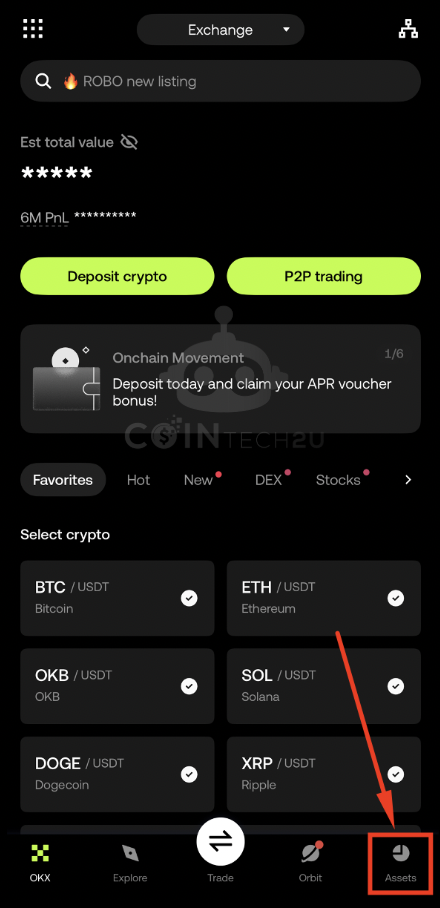
Tap Assets in OKX main account for sub-account transfer

Step 2: Tap "Transfer"

Tap the Transfer button to access the transfer interface.
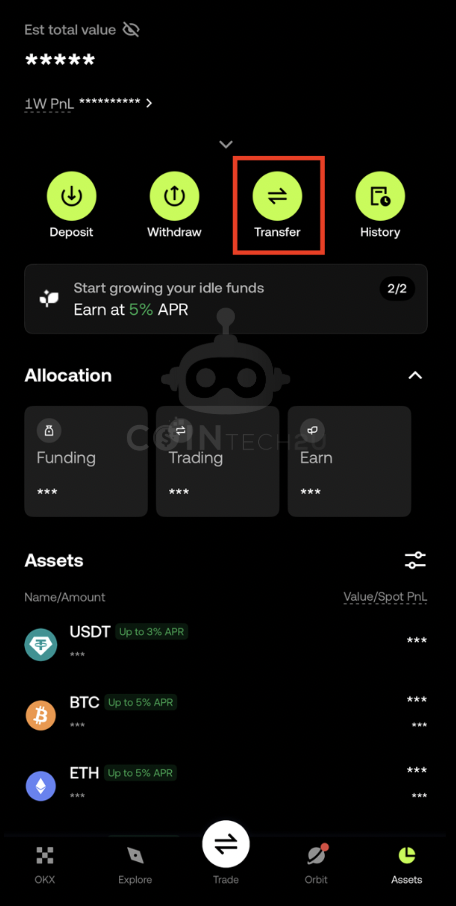
Tap Transfer for sub-account fund transfer

Step 3: Transfer to Sub-Account Trading Wallet

Select Main and sub-account as the transfer type. Choose the corresponding sub-account from the dropdown. Set the transfer from Main Funding to the Sub-account Trading Wallet. Enter the USDT amount and confirm.
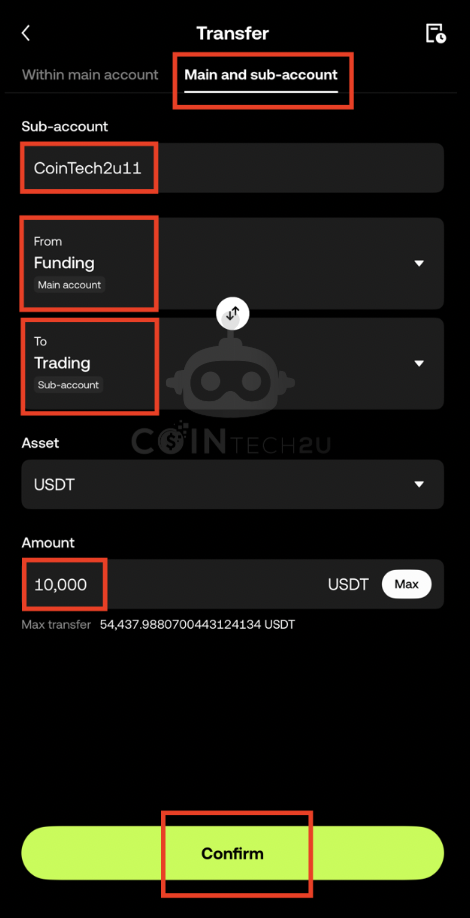
Transfer funds from main to sub-account Trading Wallet

What's Next?

Your Trading Wallet is funded and ready. Next, learn how to convert USDT to Gas Fee in CoinTech2u, which is required to activate the AI trading bot.

Next: Convert USDT to Gas Fee →

Fund Your Trading Wallet Today

Transfer USDT to your OKX Trading Wallet and start AI-powered crypto trading with CoinTech2u.

Share this article:

Related Articles

Tutorial
How to Switch to Futures Mode and Hedge Mode in OKX

8-step guide to switch your OKX account to Futures Mode and enable Hedge Mode, required settings bef...

CoinTech2u Read More →
Tutorial
How to Convert USDT to Gas Fee in CoinTech2u (via OKX)

17-step guide to deposit USDT from OKX to your CoinTech2u wallet via TRC20 network and convert it to...

CoinTech2u Read More →
Tutorial
How to Start AI Trading on CoinTech2u — Quick Setup Guide (OKX)

11-step guide to activate automated AI trading on CoinTech2u using Quick Setup. Configure Equity Gua...

CoinTech2u Read More →
Tutorial
How to Register an OKX Account and Complete KYC Verification

Step-by-step guide to register an OKX exchange account using the CoinTech2u referral link, complete ...

CoinTech2u Read More →
Tutorial
CoinTech2u Tutorial Guide — Complete Setup Tutorials for OKX, Bitget, Bybit & Binance

Complete tutorial hub with step-by-step guides for all 4 supported exchanges. From registration to a...

CoinTech2u Read More →
Tutorial
How to Create OKX Sub-Accounts and Bind to CoinTech2u

15-step guide to create sub-accounts in the OKX app and bind them to CoinTech2u portfolios via Fast ...

CoinTech2u Read More →
Tutorial
How to Bind OKX Fast API in CoinTech2u

Quick 8-step guide to connect your OKX account to CoinTech2u via Fast API. One-tap OAuth binding thr...

CoinTech2u Read More →
Tutorial
How to Register a Bitget Account and Complete KYC Verification

15-step guide to register a Bitget exchange account with referral code ct2u10 for 10% fee rebate, co...

CoinTech2u Read More →
Tutorial
How to Enable 2-Factor Authentication (Google Authenticator) on Bitget

14-step guide to set up Google Authenticator 2FA on your Bitget account for enhanced security before...

CoinTech2u Read More →
Tutorial
How to Transfer Funds to Your Bitget Sub-Account in CoinTech2u

5-step guide to transfer USDT from your Bitget main account Funding Wallet to sub-account Trading Wa...

CoinTech2u Read More →

This article is for educational and informational purposes only and does not constitute investment advice. Investing involves risks, please invest cautiously.

Start Free Trading →