Back to Blog List

How to Bind OKX Fast API in CoinTech2u

Tutorial
C
CoinTech2u
CoinTech2u Community Columnist
Quick 8-step guide to connect your OKX account to CoinTech2u via Fast API. One-tap OAuth binding through the OKX app — no manual API key creation needed.
1

Bind OKX Fast API

Step 1: Tap "Bind API" on the Homepage

Open the CoinTech2u app and tap the Bind API button on your homepage to begin connecting your exchange account.
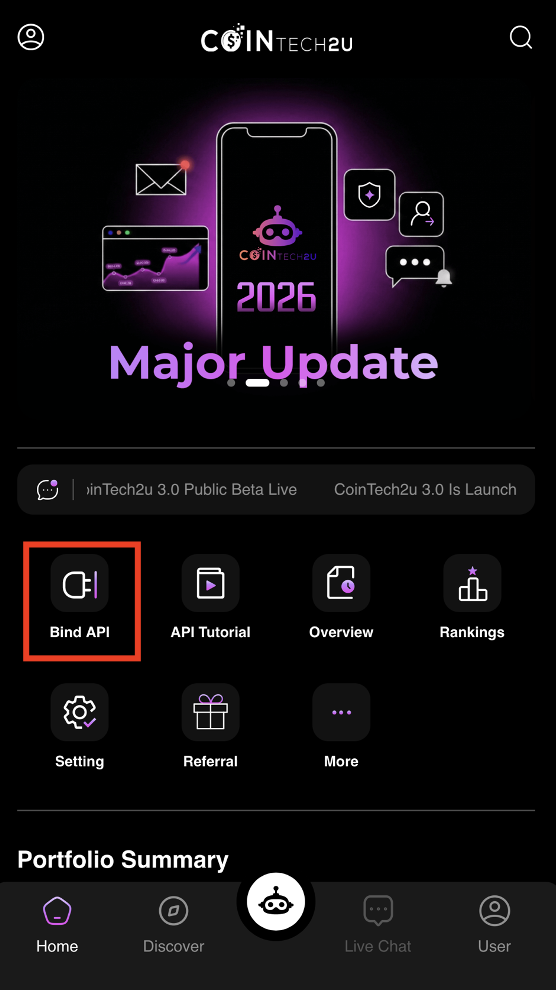
Tap Bind API on CoinTech2u homepage

Step 2: Select "Bind API"

Tap the Bind API option to proceed to the exchange selection and portfolio setup screen.
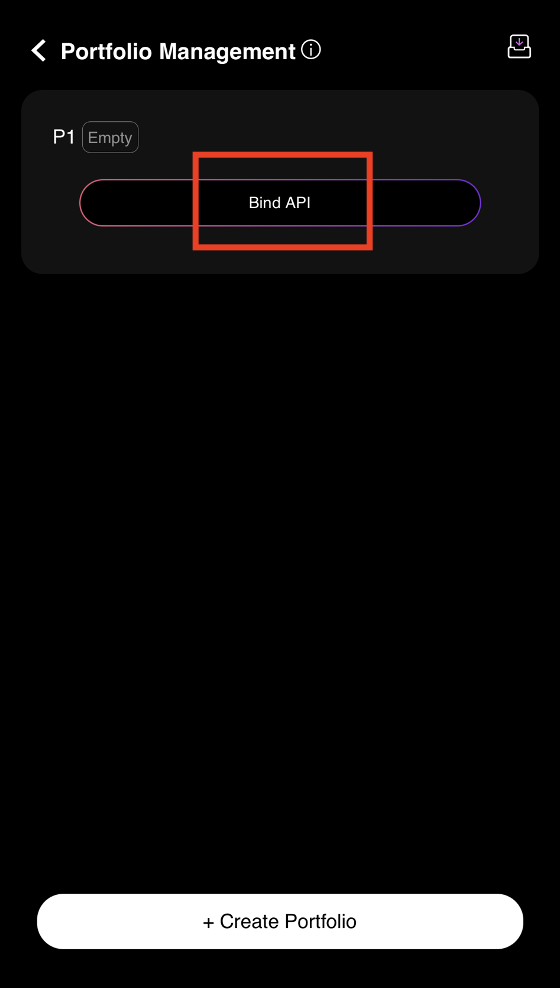
Select Bind API option in CoinTech2u

Step 3: Enter Portfolio Name and Select OKX

Type a name for your portfolio (e.g., "Portfolio 1" or "Main Trading") and select OKX as the exchange you want to bind.
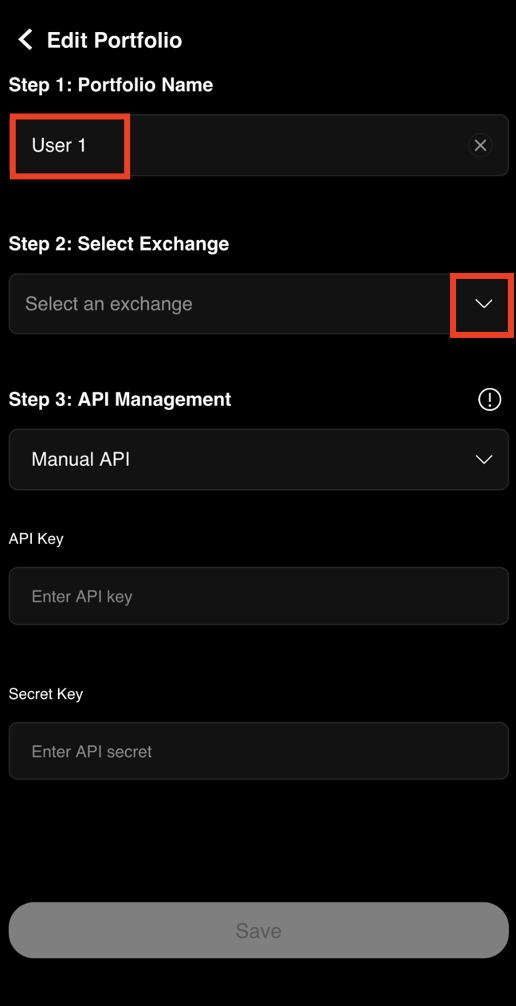
Enter portfolio name and select OKX exchange

Step 4: Confirm Your Exchange Selection

After selecting OKX, tap OK to confirm and proceed to the API binding step.
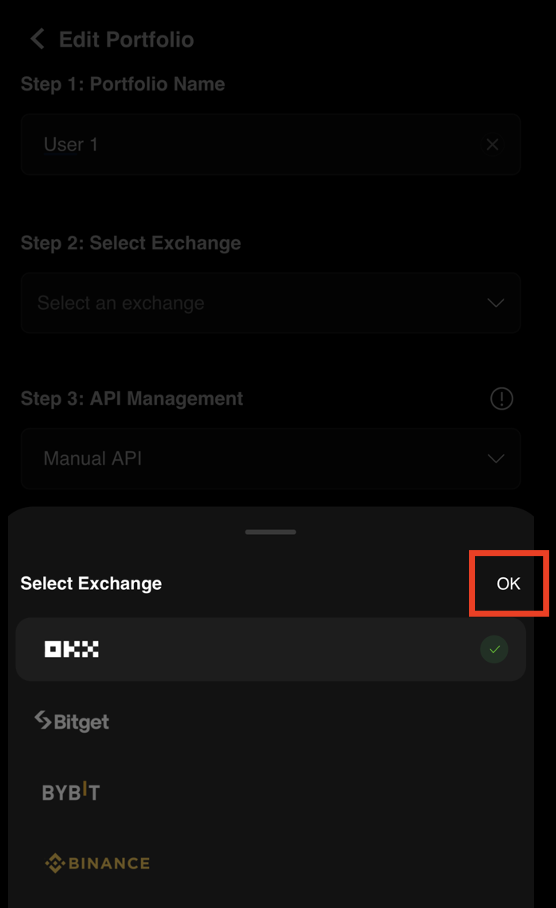
Confirm OKX exchange selection

Step 5: Tap "Bind API" to Start Connection

Tap the Bind API button to initiate the Fast API connection between CoinTech2u and your OKX account.
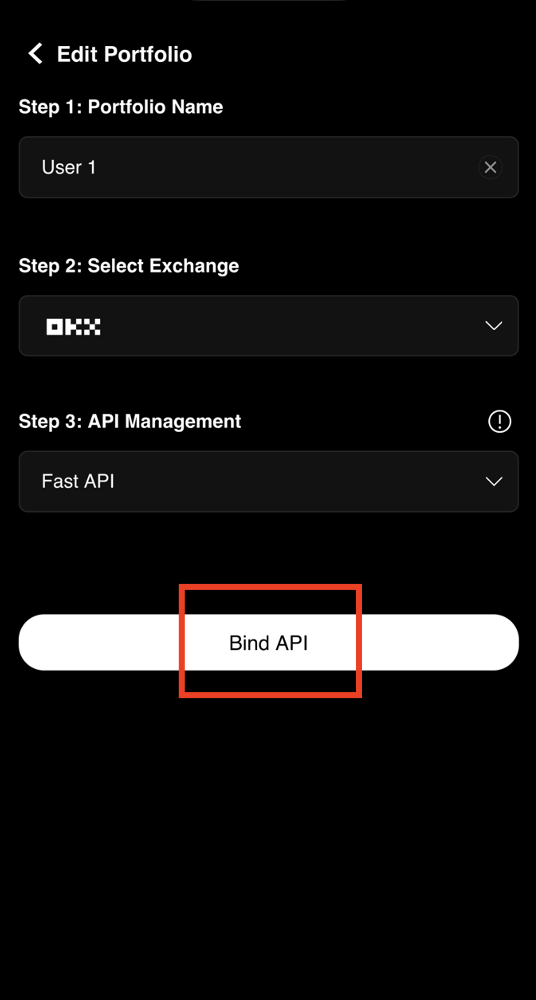
Start OKX Fast API binding process

Step 6: Open the OKX App for Authorization

Tap Open when prompted. You will be automatically redirected to the OKX app to authorize the API connection.
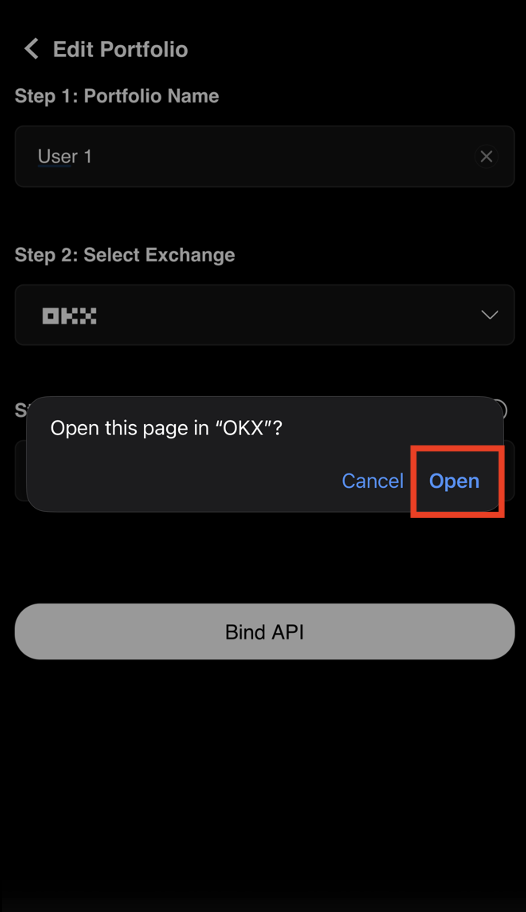
Redirect to OKX app for API authorization

Step 7: Approve the API Connection in OKX

In the OKX app, review the permissions and tap Approve to authorize CoinTech2u to connect via Fast API. This grants trading permissions only — no withdrawal access.
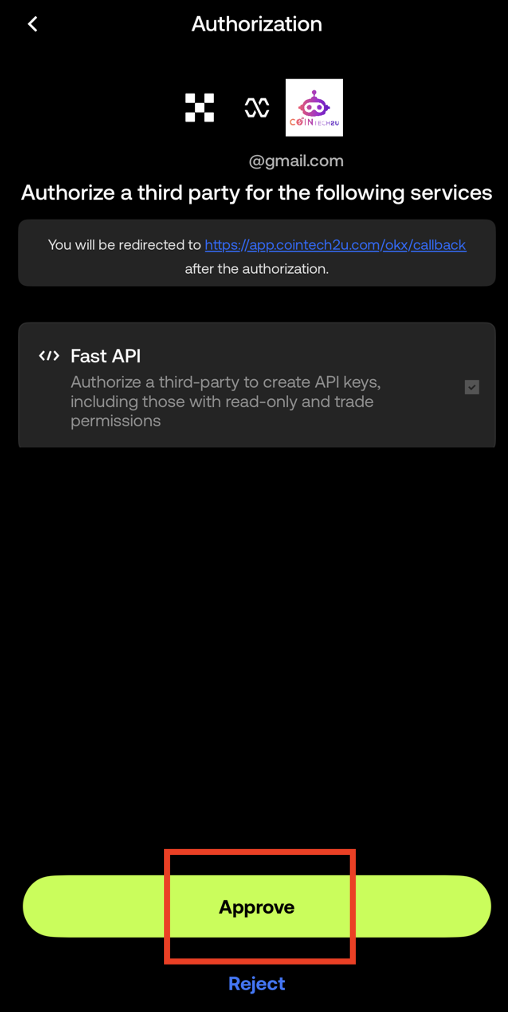
Approve CoinTech2u Fast API connection in OKX

Step 8: API Binding Complete!

Your Portfolio 1 (P1) has been successfully connected to your OKX account via Fast API. You can now use CoinTech2u's AI trading bot with your OKX account.
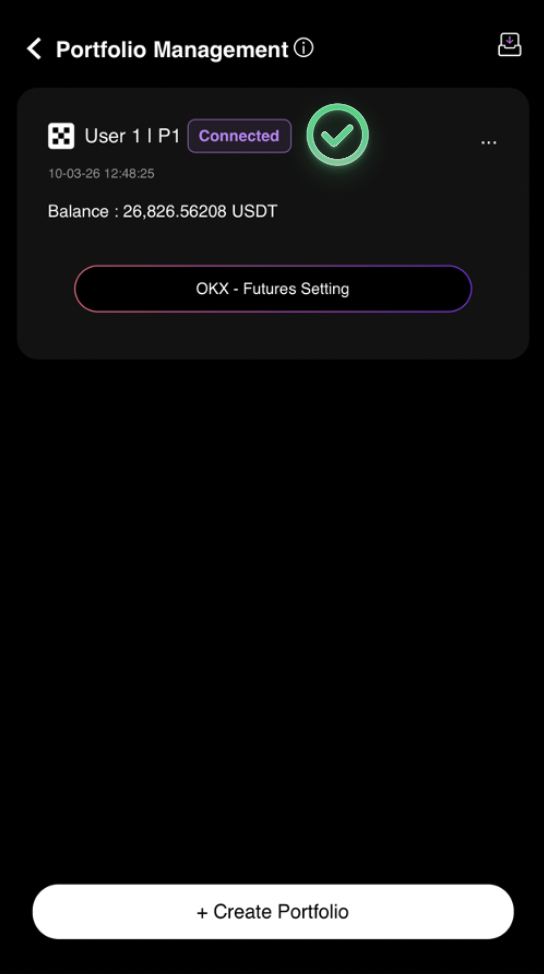
OKX Fast API successfully bound to CoinTech2u

What's Next?

Your OKX account is now connected. Next, you need to switch your OKX account to Futures Mode and Hedge Mode before you can start AI trading.

Next: Switch to Futures & Hedge Mode →

Start AI-Powered Crypto Trading

Connect your OKX account to CoinTech2u and let AI trade for you 24/7.

Share this article:

Related Articles

Tutorial
How to Create OKX Sub-Accounts and Bind to CoinTech2u

15-step guide to create sub-accounts in the OKX app and bind them to CoinTech2u portfolios via Fast ...

CoinTech2u Read More →
Tutorial
How to Register an OKX Account and Complete KYC Verification

Step-by-step guide to register an OKX exchange account using the CoinTech2u referral link, complete ...

CoinTech2u Read More →
Tutorial
How to Switch to Futures Mode and Hedge Mode in OKX

8-step guide to switch your OKX account to Futures Mode and enable Hedge Mode, required settings bef...

CoinTech2u Read More →
Tutorial
How to Convert USDT to Gas Fee in CoinTech2u (via OKX)

17-step guide to deposit USDT from OKX to your CoinTech2u wallet via TRC20 network and convert it to...

CoinTech2u Read More →
Tutorial
How to Start AI Trading on CoinTech2u — Quick Setup Guide (OKX)

11-step guide to activate automated AI trading on CoinTech2u using Quick Setup. Configure Equity Gua...

CoinTech2u Read More →
Tutorial
How to Bind Bitget Fast API in CoinTech2u

13-step guide to connect your Bitget account to CoinTech2u via Fast API, including email and Google ...

CoinTech2u Read More →
Tutorial
How to Create Bitget Sub-Accounts in CoinTech2u

5-step guide to create and bind Bitget sub-accounts within CoinTech2u for multi-portfolio AI trading...

CoinTech2u Read More →
Tutorial
How to Bind Bybit Fast API in CoinTech2u

12-step guide to connect your Bybit account to CoinTech2u via Fast API, enter credentials, verify wi...

CoinTech2u Read More →
Tutorial
How to Create Bybit Sub-Accounts in CoinTech2u

5-step guide to create and bind Bybit sub-accounts within CoinTech2u for managing multiple trading p...

CoinTech2u Read More →
Tutorial
How to Create a Binance API Key and Bind It in CoinTech2u

Comprehensive guide covering 4 sections: enable 2FA with Google Authenticator, activate Futures and ...

CoinTech2u Read More →

This article is for educational and informational purposes only and does not constitute investment advice. Investing involves risks, please invest cautiously.

Start Free Trading →