Back to Blog List

How to Create Bybit Sub-Accounts in CoinTech2u

Tutorial
C
CoinTech2u
CoinTech2u Community Columnist
5-step guide to create and bind Bybit sub-accounts within CoinTech2u for managing multiple trading portfolios.
1

Create Bybit Sub-Accounts

Step 1: Open Bind API

On the CoinTech2u homepage, tap Bind API to access your connected exchange accounts.
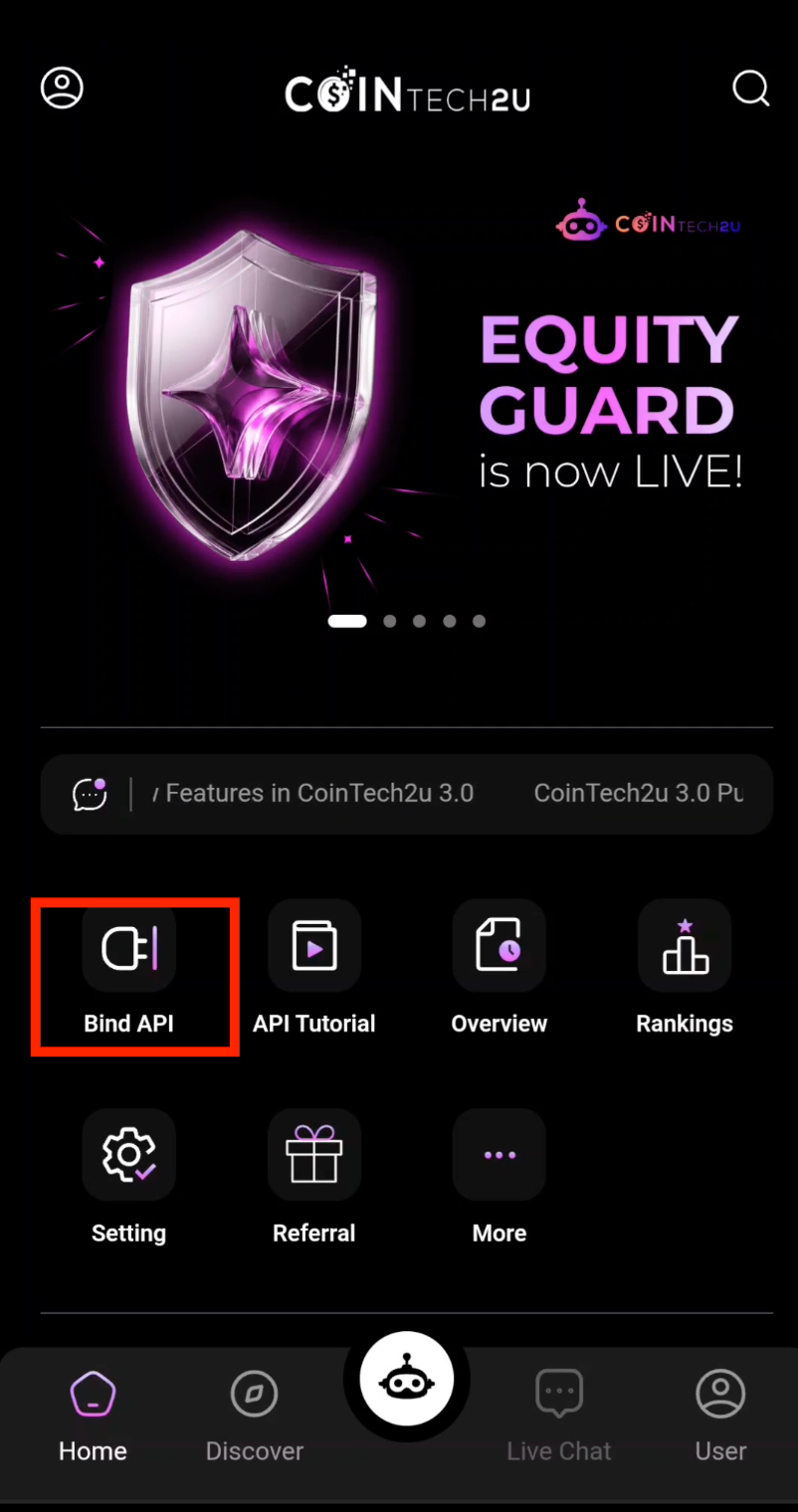
CoinTech2u homepage Bind API

Step 2: Choose Bybit Sub-Account

Tap Choose Bybit Sub-Account to view and manage your existing sub-accounts.
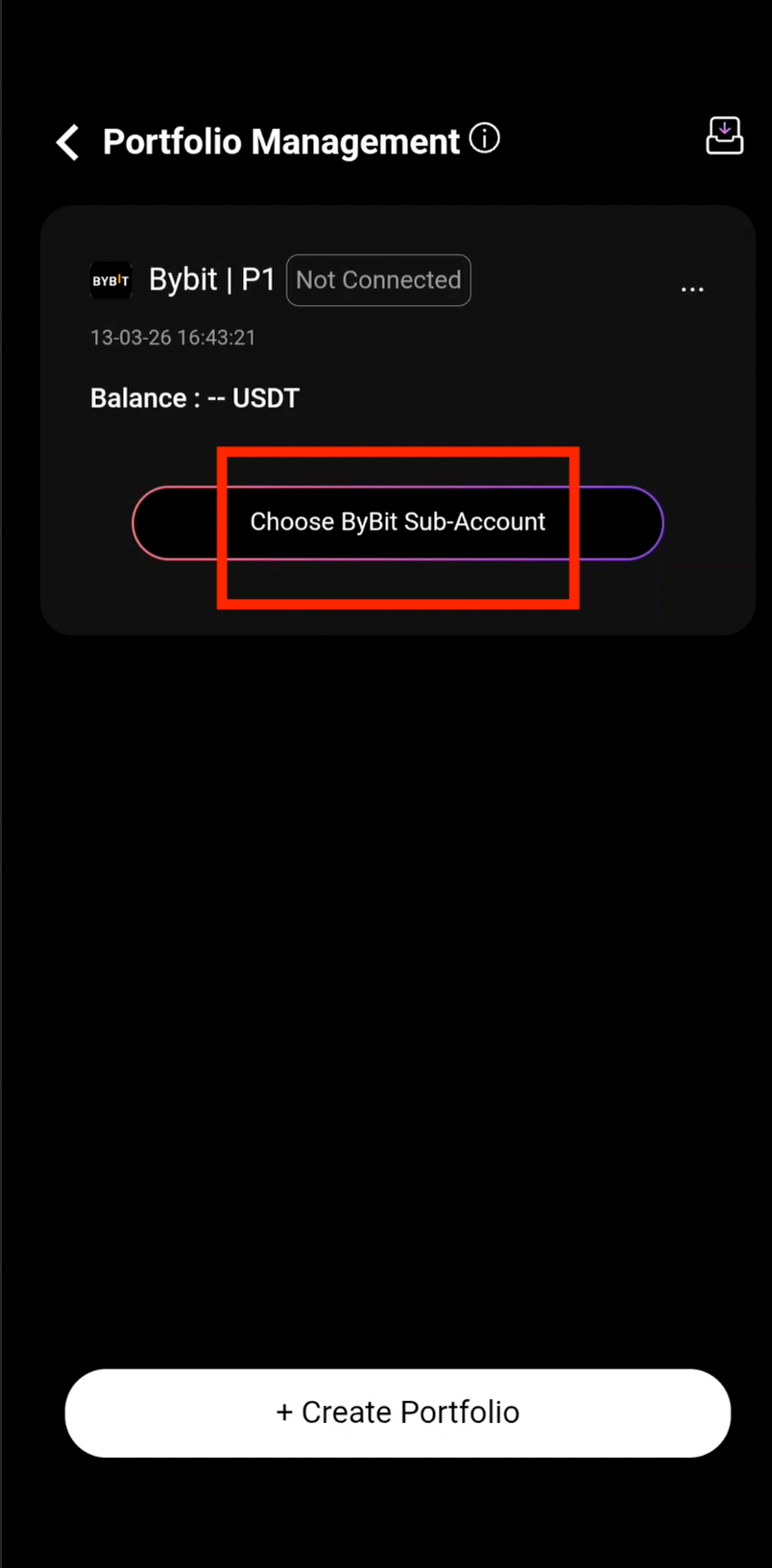
Choose Bybit sub-account option

Step 3: Create a New Sub-Account

Tap + Create Sub-Account to generate a new dedicated trading sub-account on Bybit.
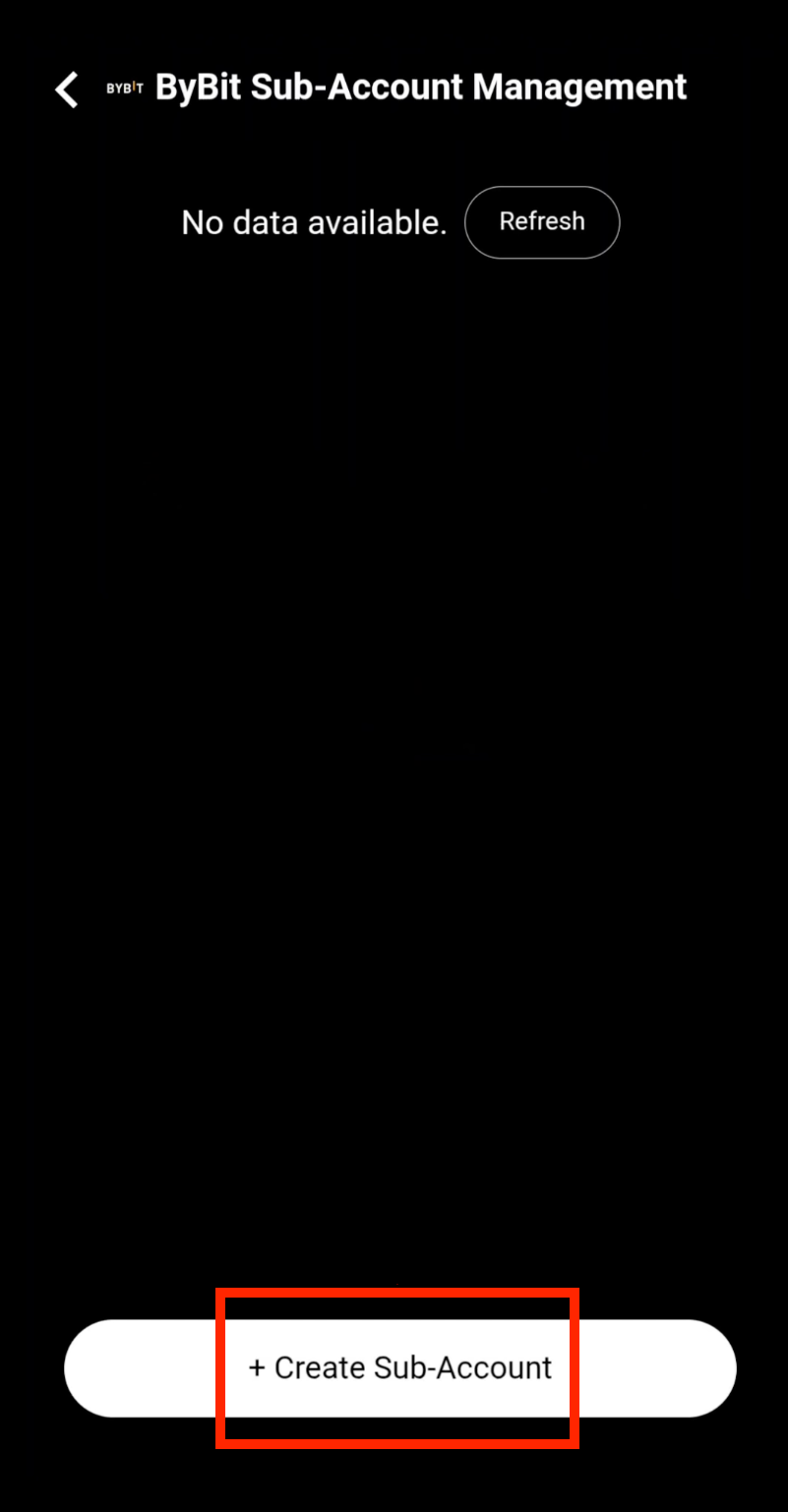
Create new Bybit sub-account

Step 4: Bind the Sub-Account

Your sub-account has been created successfully. Tap Bind to connect it to your CoinTech2u portfolio.
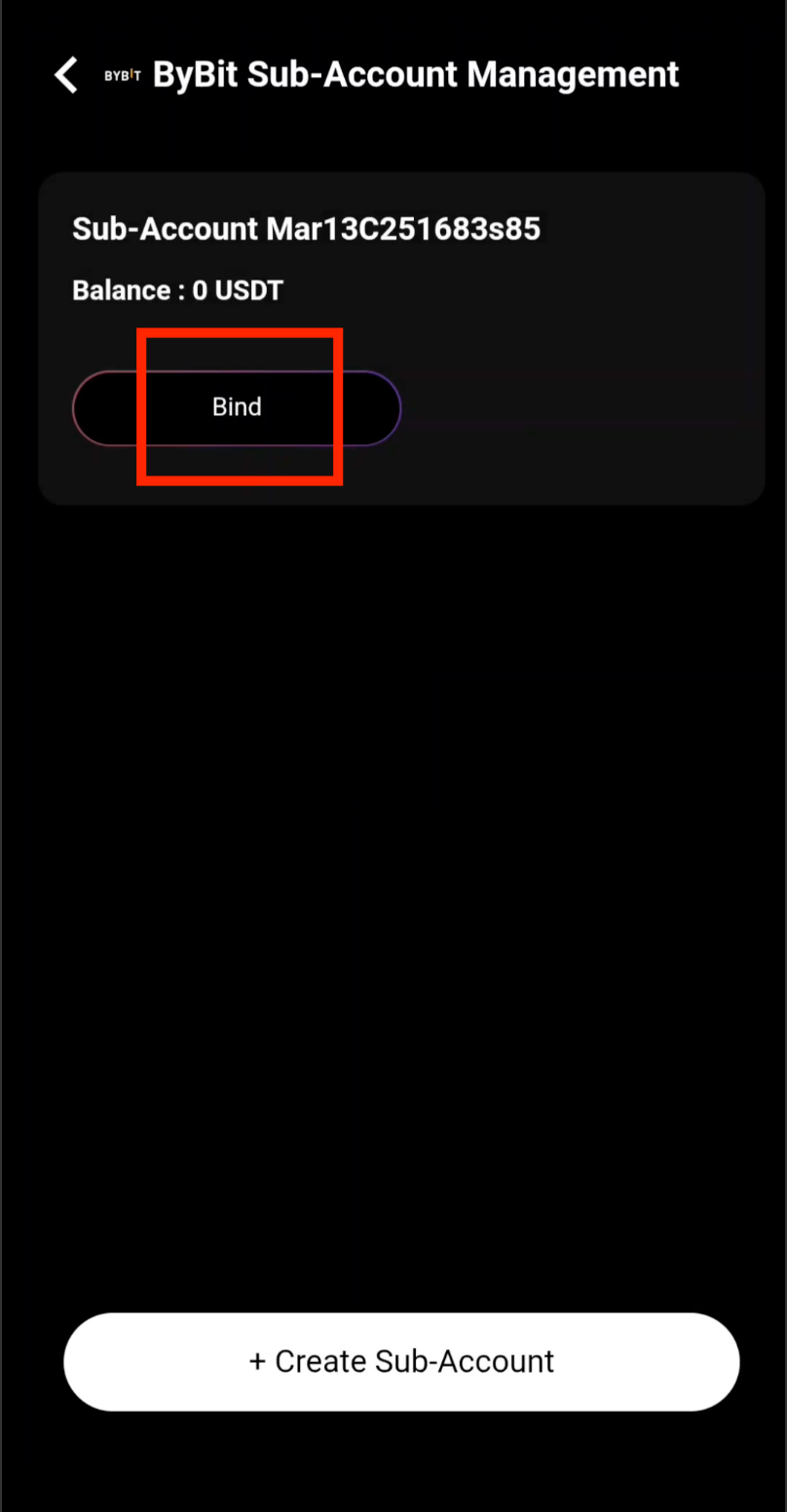
Bind Bybit sub-account to portfolio

Step 5: Sub-Account Successfully Connected

Your Bybit sub-account is now connected and ready for trading. You can repeat these steps to create additional sub-accounts as needed.
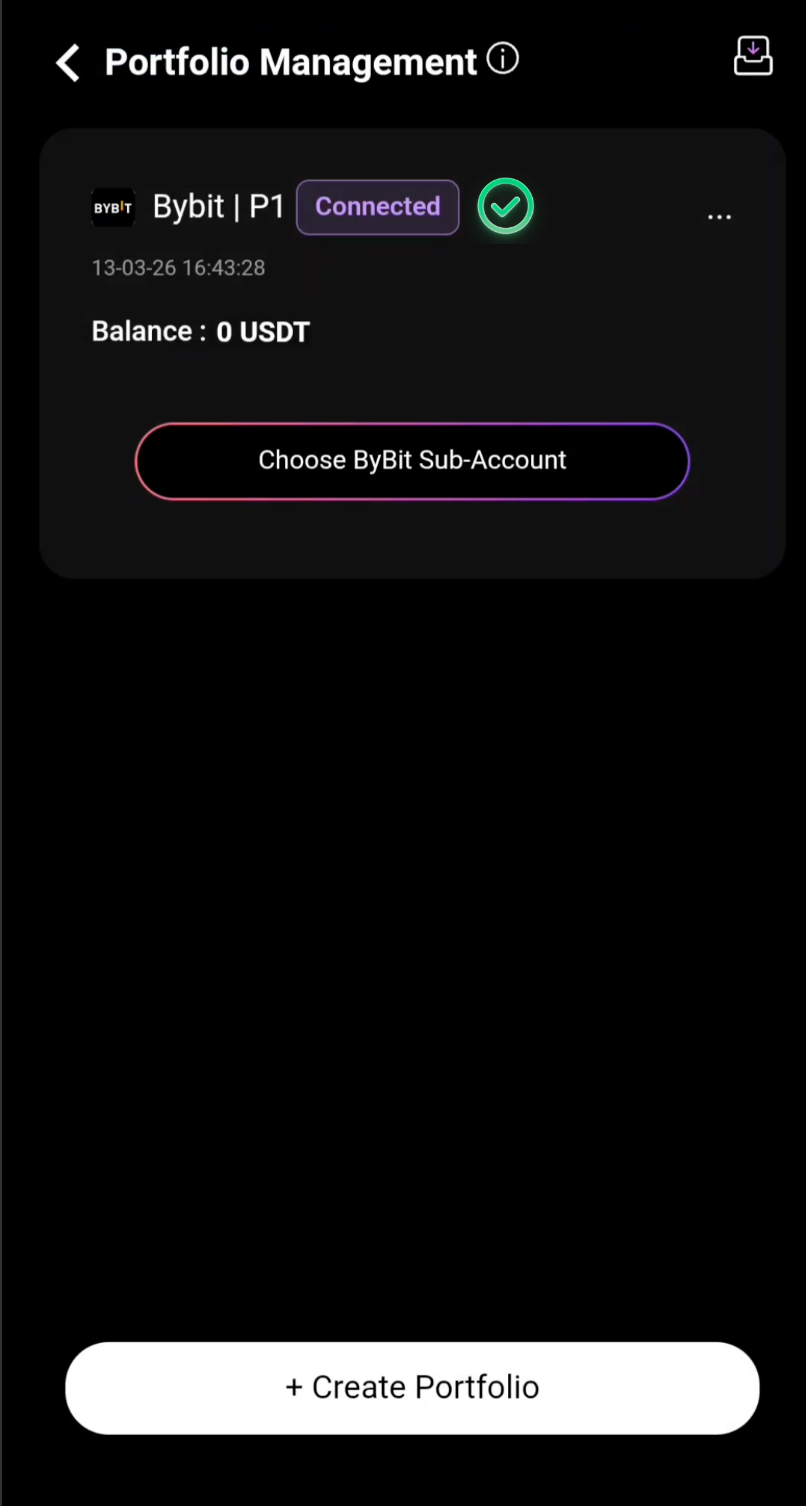
Bybit sub-account successfully connected

What's Next?

Your sub-accounts are ready. Next, learn how to transfer funds from your Bybit main account to your sub-account's trading wallet so you can begin automated trading.

Next: Transfer Funds to Sub-Account

Frequently Asked Questions

Why do I need sub-accounts for Bybit trading on CoinTech2u?

Sub-accounts allow you to separate your trading capital into dedicated portfolios, each running its own AI trading strategy. This provides better risk management by isolating funds between strategies. If one portfolio underperforms, it does not affect the others. Sub-accounts also make it easier to track performance per strategy.

How many Bybit sub-accounts can I create in CoinTech2u?

You can create multiple Bybit sub-accounts in CoinTech2u based on your Bybit account tier and verification level. Each sub-account operates independently with its own trading wallet, allowing you to run different strategies or allocate capital across multiple portfolios simultaneously.

What are the benefits of using multiple sub-accounts?

Multiple sub-accounts offer several advantages: isolated risk management so losses in one strategy do not affect others, the ability to run different AI configurations for each portfolio, clearer profit and loss tracking per strategy, and the flexibility to allocate varying amounts of capital to different trading approaches based on your risk tolerance.

Manage Multiple Portfolios with CoinTech2u

Register your free CoinTech2u account and create multiple Bybit sub-accounts for diversified AI trading strategies.

Register CoinTech2u Free
Share this article:

Related Articles

Tutorial
How to Bind Bybit Fast API in CoinTech2u

12-step guide to connect your Bybit account to CoinTech2u via Fast API, enter credentials, verify wi...

CoinTech2u Read More →
Tutorial
How to Transfer Funds to Your Bybit Sub-Account in CoinTech2u

5-step guide to transfer USDT from your Bybit main account Funding Wallet to sub-account Trading Wal...

CoinTech2u Read More →
Tutorial
How to Convert USDT to Gas Fee in CoinTech2u (via Bybit)

19-step guide to deposit USDT from Bybit to your CoinTech2u wallet via BEP20 network and convert it ...

CoinTech2u Read More →
Tutorial
How to Bind OKX Fast API in CoinTech2u

Quick 8-step guide to connect your OKX account to CoinTech2u via Fast API. One-tap OAuth binding thr...

CoinTech2u Read More →
Tutorial
How to Create OKX Sub-Accounts and Bind to CoinTech2u

15-step guide to create sub-accounts in the OKX app and bind them to CoinTech2u portfolios via Fast ...

CoinTech2u Read More →
Tutorial
How to Bind Bitget Fast API in CoinTech2u

13-step guide to connect your Bitget account to CoinTech2u via Fast API, including email and Google ...

CoinTech2u Read More →
Tutorial
How to Create Bitget Sub-Accounts in CoinTech2u

5-step guide to create and bind Bitget sub-accounts within CoinTech2u for multi-portfolio AI trading...

CoinTech2u Read More →
Tutorial
How to Register a Bybit Account and Complete KYC Verification

19-step guide to register a Bybit exchange account via CoinTech2u referral link, download the app, c...

CoinTech2u Read More →
Tutorial
How to Start AI Trading on CoinTech2u — Quick Setup Guide (Bybit)

11-step guide to activate automated AI trading on CoinTech2u with your Bybit account. Configure Equi...

CoinTech2u Read More →
Tutorial
How to Create a Binance API Key and Bind It in CoinTech2u

Comprehensive guide covering 4 sections: enable 2FA with Google Authenticator, activate Futures and ...

CoinTech2u Read More →

This article is for educational and informational purposes only and does not constitute investment advice. Investing involves risks, please invest cautiously.

Start Free Trading →