Back to Blog List

How to Transfer Funds to Your Bybit Sub-Account in CoinTech2u

Tutorial
C
CoinTech2u
CoinTech2u Community Columnist
5-step guide to transfer USDT from your Bybit main account Funding Wallet to sub-account Trading Wallet via CoinTech2u.
1

Transfer Funds to Sub-Account

Step 1: Open Bind API

On the CoinTech2u homepage, tap Bind API to access your connected exchange accounts.
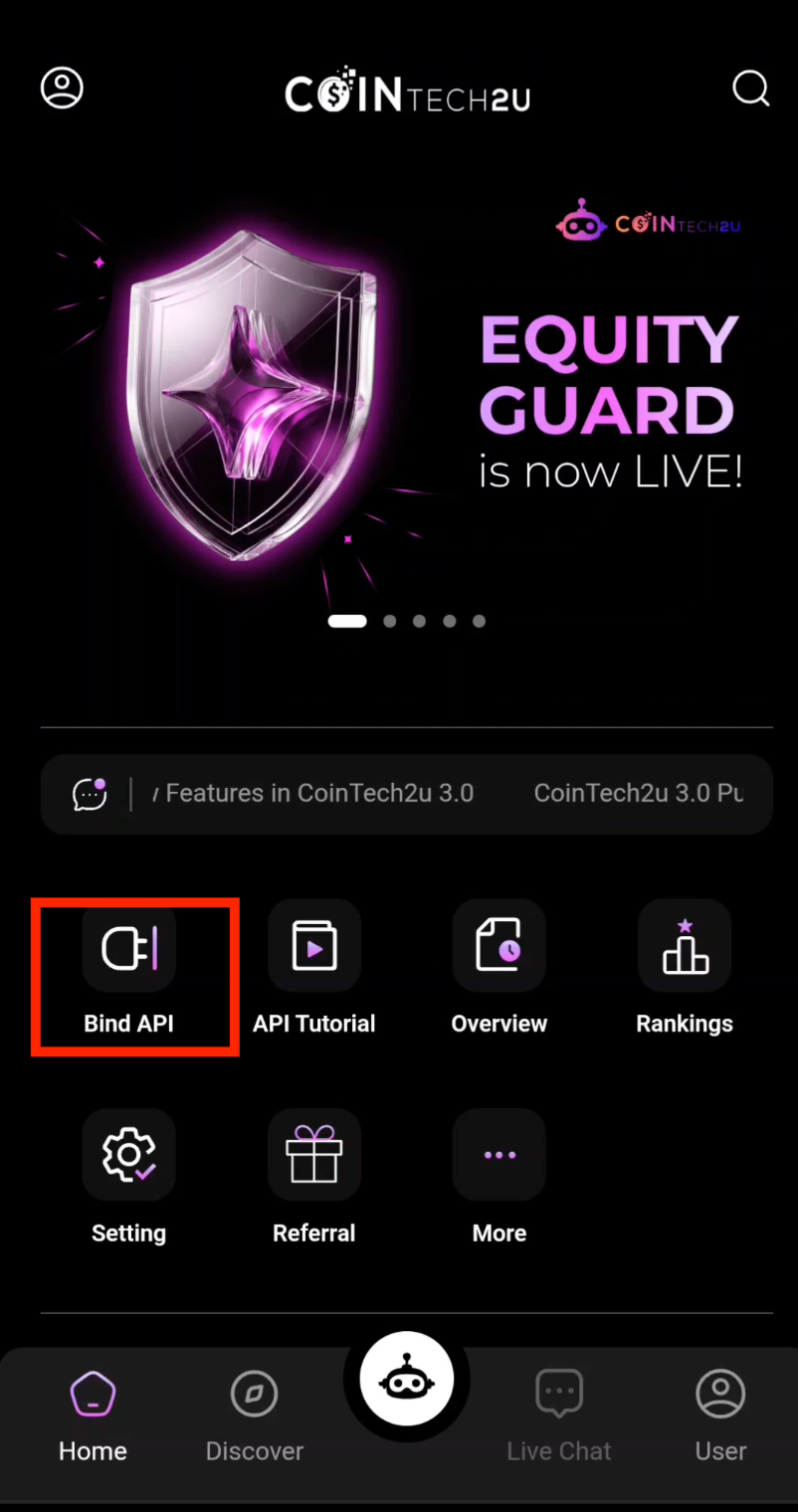
CoinTech2u Bind API homepage

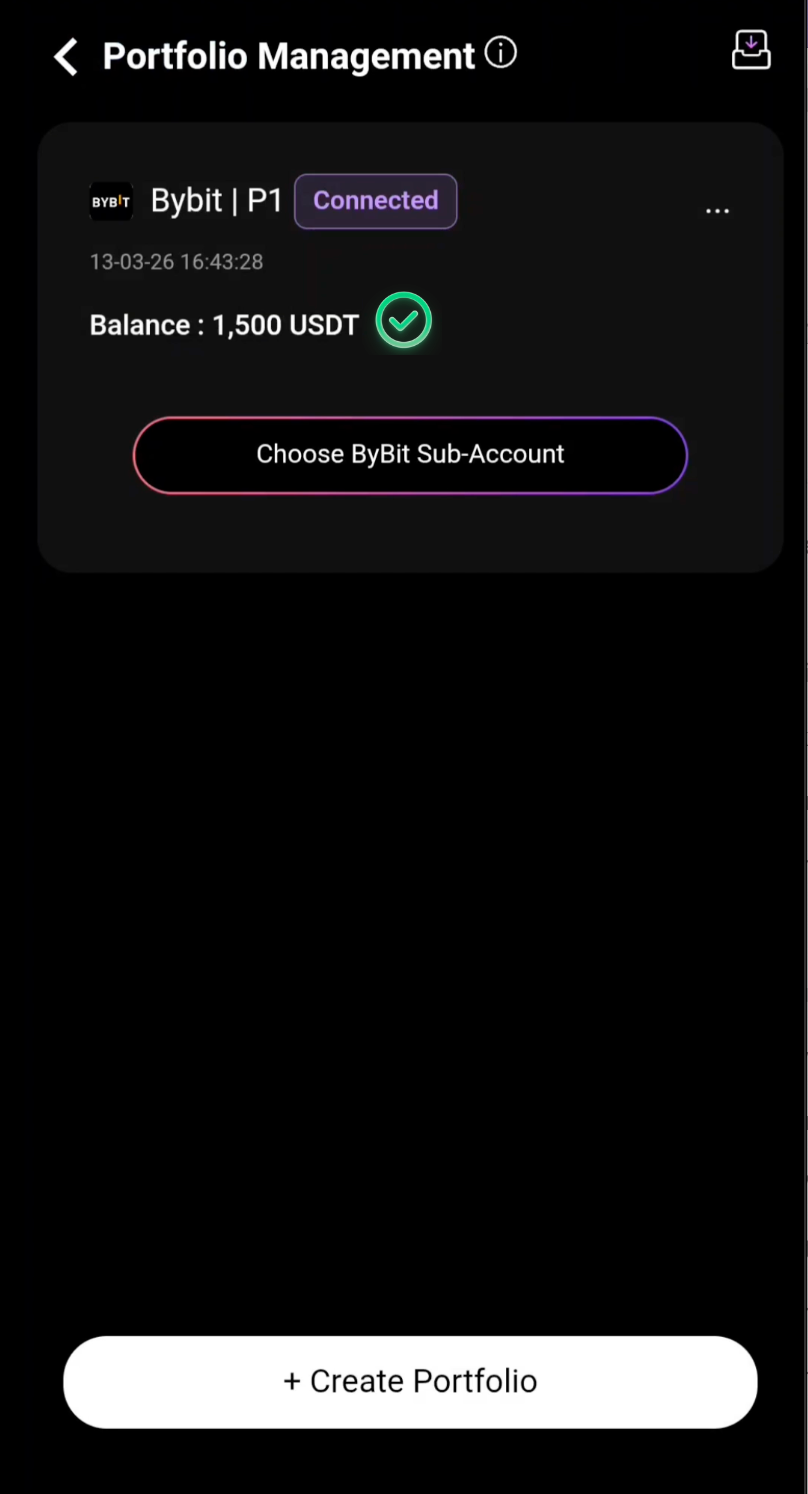
Step 2: Choose Bybit Sub-Account

Tap Choose Bybit Sub-Account to select the sub-account you want to fund.
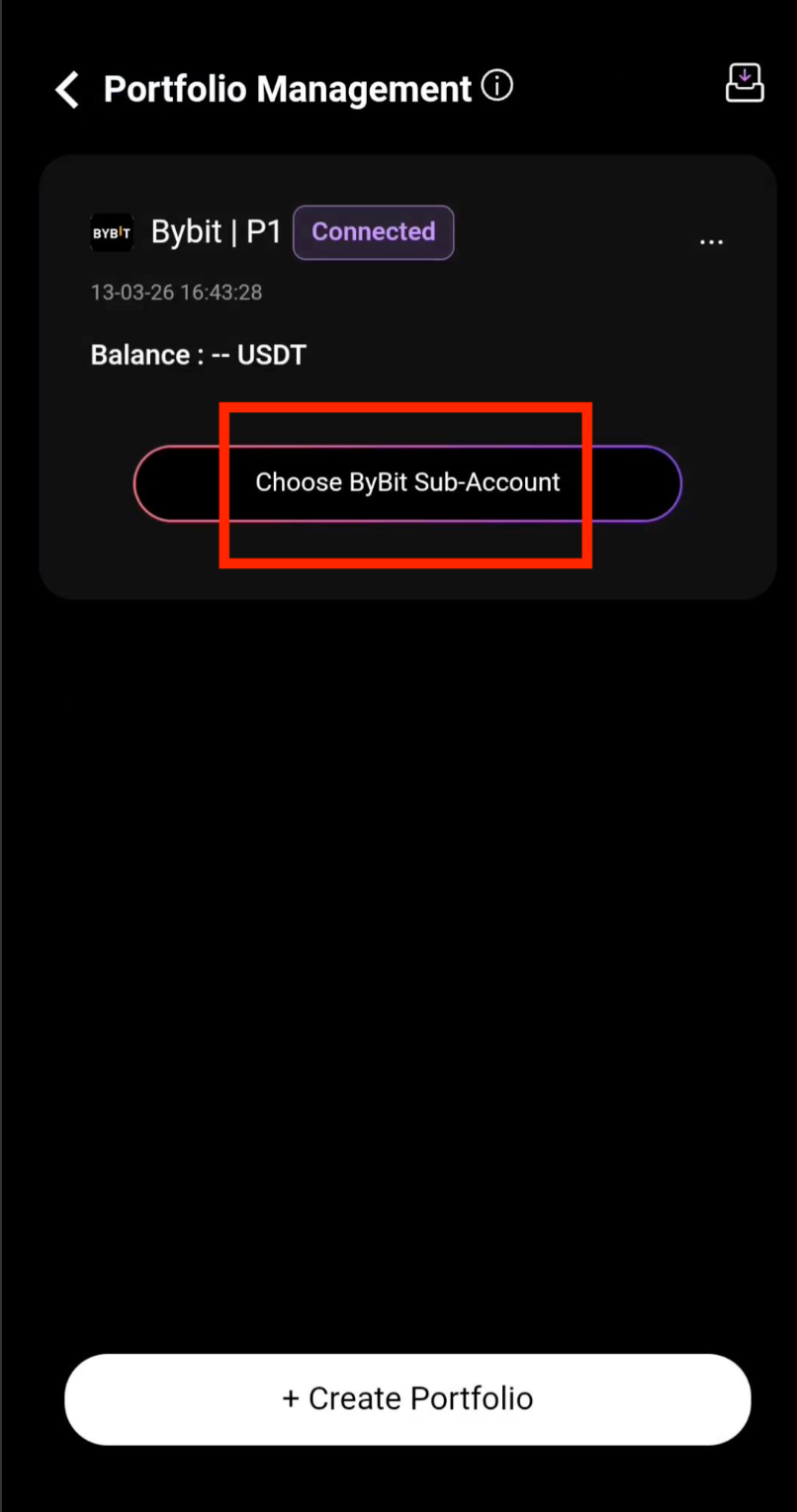
Choose Bybit sub-account for transfer

Step 3: Tap Transfer Fund

Tap Transfer Fund to open the fund transfer interface.
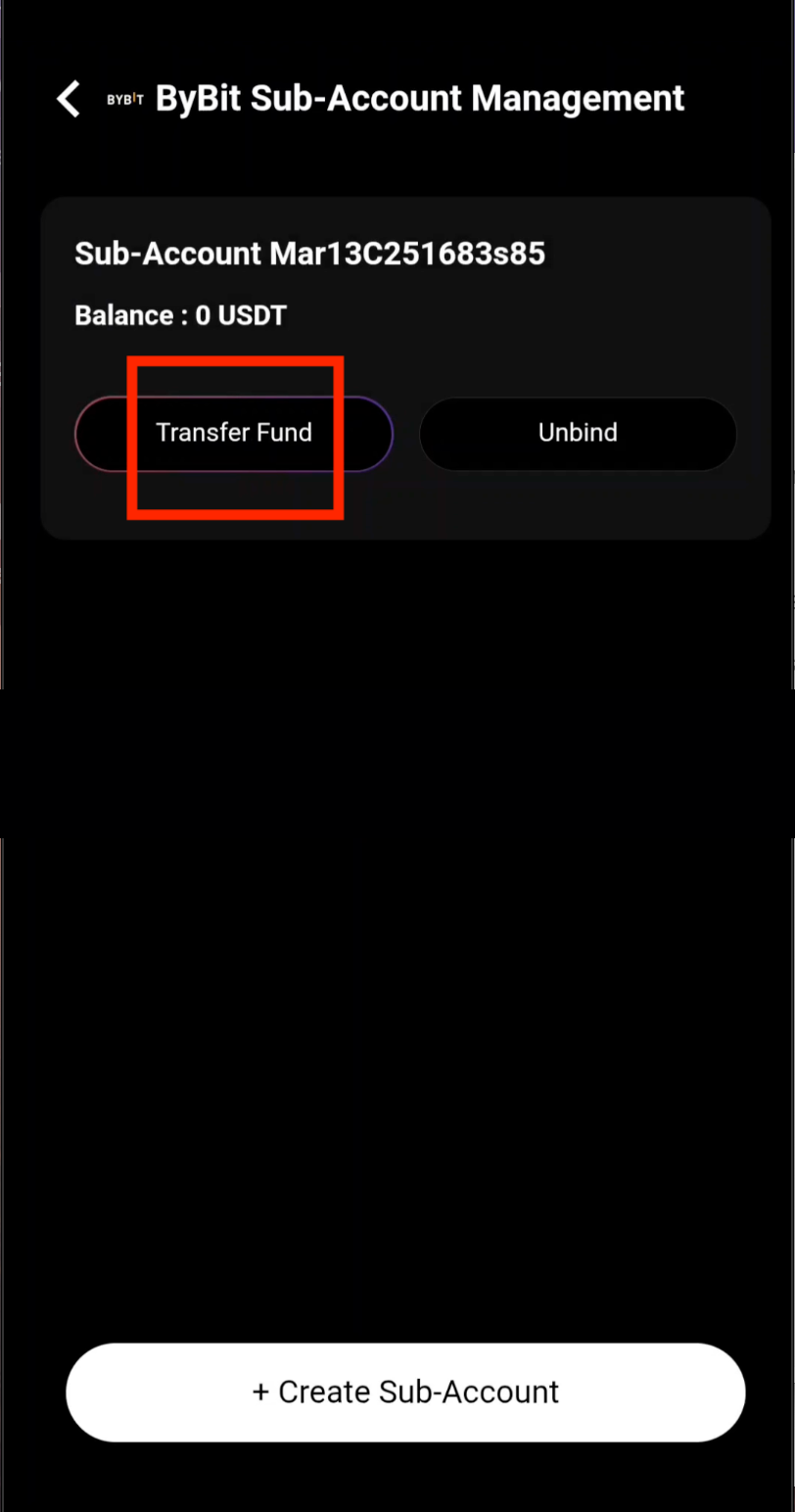
Transfer fund button in CoinTech2u

Step 4: Enter the Transfer Amount

Transfer funds from your Main account: Funding Wallet to the Sub-account: Trading Wallet. Enter the amount of USDT you wish to allocate for trading, then tap Confirm.
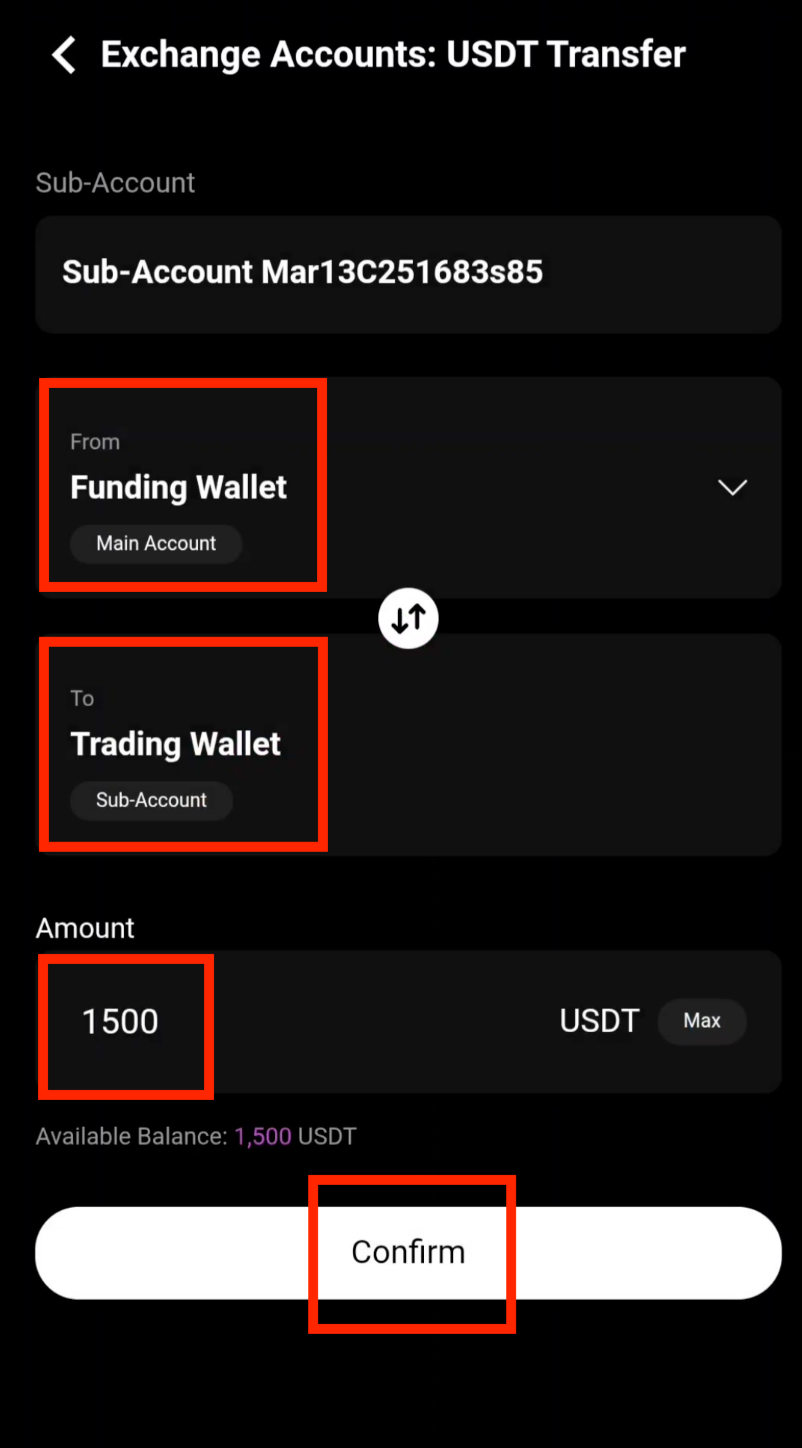
Enter USDT transfer amount

Step 5: Transfer Complete

Your funds have been transferred successfully. The USDT is now in your sub-account trading wallet and you can start AI automated trading.
Fund transfer successful

What's Next?

Your trading wallet is funded. Before starting AI trading, you may need to convert some USDT to gas fees. Learn how in the next guide.

Next: Convert USDT to Gas Fee

Frequently Asked Questions

What is the minimum amount to transfer to a Bybit sub-account?

There is no strict minimum for internal transfers between your Bybit main account and sub-accounts. However, for effective AI trading on CoinTech2u, we recommend transferring at least 100 USDT to your sub-account trading wallet. Higher amounts allow the AI to work with more trading pairs and optimize returns.

How long does the fund transfer take between Bybit accounts?

Internal transfers between your Bybit main account and sub-accounts are instant. The funds appear in your sub-account trading wallet immediately after you confirm the transfer. There are no network fees or waiting times for internal transfers within the same Bybit account.

Can I transfer funds back from my sub-account to my main account?

Yes, you can transfer funds back from your sub-account trading wallet to your main account funding wallet at any time. Simply use the same Transfer Fund feature in CoinTech2u and reverse the direction. Make sure to stop any active trading strategies before withdrawing all funds from a sub-account.

Fund Your Trading Portfolio Today

Register CoinTech2u for free, connect your Bybit account, and start funding your AI trading sub-accounts.

Register CoinTech2u Free
Share this article:

Related Articles

Tutorial
How to Convert USDT to Gas Fee in CoinTech2u (via Bybit)

19-step guide to deposit USDT from Bybit to your CoinTech2u wallet via BEP20 network and convert it ...

CoinTech2u Read More →
Tutorial
How to Start AI Trading on CoinTech2u — Quick Setup Guide (Bybit)

11-step guide to activate automated AI trading on CoinTech2u with your Bybit account. Configure Equi...

CoinTech2u Read More →
Tutorial
How to Register a Bybit Account and Complete KYC Verification

19-step guide to register a Bybit exchange account via CoinTech2u referral link, download the app, c...

CoinTech2u Read More →
Tutorial
CoinTech2u Tutorial Guide — Complete Setup Tutorials for OKX, Bitget, Bybit & Binance

Complete tutorial hub with step-by-step guides for all 4 supported exchanges. From registration to a...

CoinTech2u Read More →
Tutorial
How to Bind Bybit Fast API in CoinTech2u

12-step guide to connect your Bybit account to CoinTech2u via Fast API, enter credentials, verify wi...

CoinTech2u Read More →
Tutorial
How to Create Bybit Sub-Accounts in CoinTech2u

5-step guide to create and bind Bybit sub-accounts within CoinTech2u for managing multiple trading p...

CoinTech2u Read More →
Tutorial
How to Register an OKX Account and Complete KYC Verification

Step-by-step guide to register an OKX exchange account using the CoinTech2u referral link, complete ...

CoinTech2u Read More →
Tutorial
How to Convert USDT to Gas Fee in CoinTech2u (via OKX)

17-step guide to deposit USDT from OKX to your CoinTech2u wallet via TRC20 network and convert it to...

CoinTech2u Read More →
Tutorial
How to Start AI Trading on CoinTech2u — Quick Setup Guide (OKX)

11-step guide to activate automated AI trading on CoinTech2u using Quick Setup. Configure Equity Gua...

CoinTech2u Read More →
Tutorial
How to Register a Bitget Account and Complete KYC Verification

15-step guide to register a Bitget exchange account with referral code ct2u10 for 10% fee rebate, co...

CoinTech2u Read More →

This article is for educational and informational purposes only and does not constitute investment advice. Investing involves risks, please invest cautiously.

Start Free Trading →